kb-retriever
This skill acts as an intelligent retrieval and Q&A assistant for local knowledge base directories. It navigates through hierarchical indexes and, for file types like PDF/Excel, mandates learning specific processing methods before performing progressive retrieval, avoiding full file loading. By combining tools like grep, Read, pdfplumber, and pandas, it efficiently extracts information from the knowledge base to answer user queries related to data lookup and information retrieval.
npx skills add https://github.com/conardli/garden-skills --skill kb-retrieverBefore / After Comparison
1 组Manually searching for specific information in large local knowledge bases, or relying on simple full-text search, is often time-consuming and laborious. This is especially true for complex formats like PDFs and Excels, where crucial data can be easily missed or long file loading times are incurred.
Through hierarchical indexing and progressive retrieval, the AI can quickly locate and extract required information, intelligently processing file types like PDF/Excel. This significantly reduces information lookup time and improves accuracy.
本地知识库检索 Skill(kb-retriever)
知识库目录说明
- 知识库存放在一个根目录下,包含多种文件类型(如
.md/.txt、.pdf、.xlsx等),通常按类型或业务用途拆分为多级子目录。 - 采用分层目录索引文件:
- 根目录有一个
data_structure.md,说明主要的「领域目录」及其用途。 - 每个领域目录下可以有自己的
data_structure.md,说明该目录下有哪些子目录/文件,以及各自用途。 - 更深一层的子目录也可以继续有
data_structure.md,形成多级索引树。
- 根目录有一个
- 知识库根目录约定:
- 默认认为知识库位于当前项目根目录下的
knowledge/目录。 - 如果用户在对话中明确指定了其他路径(例如“我的知识库在 /data/kb”或“用 ./docs 这个目录作为知识库”),则以用户指定的路径作为根目录。
- 当默认路径
knowledge/不存在或访问失败时,应向用户确认实际的知识库根目录位置,而不是随意猜测。
- 默认认为知识库位于当前项目根目录下的
- 单个业务文件可能很大:
- 不要直接用 Read 读取整文件
- 对 PDF、Excel 使用对应 Skill 进行结构化处理后,再结合 grep/局部读取做精细检索
定位 knowledge 根目录
- 根目录优先听用户:如果用户给了路径(如
./docs、./knowledge-personal),直接用用户提供的路径。 - 默认根目录:否则约定根目录为当前项目下的
knowledge/。- 使用 shell 显式检查目录是否存在:优先使用
test -d knowledge,或退而求其次使用ls -d knowledge。 - 注意:禁止使用
Glob "knowledge" in .这类模式来判断目录是否存在,Glob只返回文件路径,不返回目录本身,空结果并不能区分“目录不存在”和“目录存在但为空”。
- 使用 shell 显式检查目录是否存在:优先使用
- 只有在根目录已通过
test -d等方式确认存在时,才使用 Glob 在该目录下检索内容,并把目录作为path,例如:- 索引文件:
pattern="**/data_structure.md",path="knowledge" - 所有 Markdown:
pattern="**/*.md",path="knowledge"
- 索引文件:
- 如果默认
knowledge/不存在(test -d失败):不要猜测其他目录,明确告诉用户未找到默认根目录,并让用户指定实际知识库路径。
关键原则:先学习,再处理
遇到 PDF 或 Excel 文件时的强制检查清单:
- ✅ 已读取对应的 references 文档学习处理方法
- ✅ 已理解推荐的工具和命令
- ✅ 已将文件处理(提取/转换)完成
- ⏭️ 现在可以开始检索
禁止行为:
- ❌ 在未读取 pdf_reading.md 的情况下直接尝试处理 PDF
- ❌ 在未读取 excel_reading.md 的情况下直接尝试处理 Excel
- ❌ 跳过文件处理步骤,直接对原始 PDF/Excel 进行检索
总体流程
-
理解用户需求
- 读用户问题,提取:
- 主题/领域关键词(如“销售报表”“系统架构”“接口文档”)
- 时间或范围限定(如“2023 年 Q1”“最近版本”)
- 需要的输出类型(解释、摘要、具体字段数值等)
- 确定知识库根目录:
- 优先检查用户是否在问题中指定了知识库路径。
- 否则使用默认根目录
knowledge/。 - 若默认根目录不存在或目录结构异常,应向用户询问确认,而不是自行假设。
- 读用户问题,提取:
-
分层查看目录索引
data_structure.md- 使用一个「当前工作目录」的概念:
- 默认从用户指定的知识库根目录开始;如果用户未指定,则使用当前目录。
- 在当前工作目录下,如果存在
data_structure.md:- 使用 Read 读取该文件的前若干行(例如 limit=300),必要时分段继续读取。
- 目标:
- 了解当前目录下有哪些子目录和文件
- 理解每个子目录/文件的用途说明
- 基于用户问题,挑选最相关的若干个子目录或文件,构成候选集合。
- 对于候选子目录:
- 递归进入该子目录,将其作为新的「当前工作目录」,继续查找其中的
data_structure.md并重复上述过程。 - 在递归过程中,避免一次性深入所有分支,优先沿着与问题最相关的路径向下钻取。
- 递归进入该子目录,将其作为新的「当前工作目录」,继续查找其中的
- 对于候选业务文件(md/文本、PDF、Excel 等):
- 在完成必要的目录层级探索后,收集这些文件为最终的检索目标列表。
- 在优先级排序时:
- 优先选择用途说明与问题主题高度匹配的领域目录和文件
- 其次考虑时间/版本等约束(如果索引中有体现)
- 通用说明类文档(如 README.md、总体设计类文档)放在较后优先级
- 使用一个「当前工作目录」的概念:
-
学习文件处理方法(遇到 PDF/Excel 时强制执行)
- 在处理 PDF 文件前:
- 必须先读取 references/pdf_reading.md(注意这个目录位于 Skills 目录下,而不是 Knowledge 目录下)学习提取方法
- 重点了解:pdftotext 命令、pdfplumber 用法、表格提取方法
- 在处理 Excel 文件前:
- 必须先读取 references/excel_reading.md学习读取方法
- 必须先读取 references/excel_analysis.md学习分析方法
- 重点了解:pandas 读取、列筛选、数据过滤
- 目的:确保使用正确的工具和方法,避免盲目检索
- 在处理 PDF 文件前:
-
按文件类型执行处理和检索
- 使用刚学到的方法处理文件(提取、转换、结构化)
- 对每类候选文件,按照下面「Markdown/文本」「PDF」「Excel」策略执行
- 总原则:
- 优先从最相关、最精确的文件开始
- 每个文件内都渐进式地局部检索,避免一次性加载全内容
- 若当前文件得不到满意信息,切换到下一个候选文件
-
迭代检索
- 所有文件类型都使用统一的「多轮迭代检索机制」(见上文公共检索原则)
-
答案组织与溯源
- 汇总多轮检索得到的上下文,综合回答用户问题。
- 尽量:
- 给出清晰、直接的回答
- 指出使用过的文件名(必要时包含大致位置,如章节或大概行数/页数)
- 如果答案基于推断或信息不完全:
- 明确标注假设与不确定性
- 提示用户可以补充更具体的文件范围或关键词
公共检索原则
关键词选择策略
- 从用户问题提取 3-8 个关键词(含可能的英文缩写、同义词、上位/下位词)
- 可组合词组(如 "销售 报表"、"API 接口 超时")
- 必要时包含业务词、技术术语、常见缩写(如 "uv"、"pv"、"GMV")
grep 检索基本原则
- 始终指定尽量精准的 include 和 path,避免搜索整个目录
- pattern 优先尝试问题中的核心名词、术语,再尝试同义词
- 对于每个命中,只读取匹配附近的局部区域(上下若干行)
- 保存「文件名 + 位置信息 + 文本片段」
多轮迭代检索机制(最多 5 次)
所有文件类型都采用统一的迭代策略:
- 迭代控制
- 维护「已尝试检索次数」计数,最多 5 次
- 每次检索后累加计数
- 每轮迭代流程
- 基于问题生成/更新检索关键词(可包括同义词、扩展词)
- 选择尚未充分检索的文件或文件部分
- 执行检索(grep/局部读取/专用 Skill 调用)
- 分析获取的上下文片段
- 判断是否足够回答问题
- 终止条件
- 找到足够支撑回答的上下文;或
- 已达到 5 次尝试仍未找到合适信息
- 信息不足时的处理
- 明确告知用户信息缺失或可能不在当前知识库中
- 提供已找到的最接近信息,并说明不确定性
- 提示用户可以如何缩小范围(更具体的文件名、关键词、时间范围等)
注意事项
- 禁止第一次就直接调用:
Glob "knowledge" in .或任何试图用 Glob 判定目录存在性的调用,目录存在性应通过 shell 命令(如test -d)检查。 - 使用本 Skill 查询知识库时,禁止使用网络搜索等其他工具获取知识
针对不同文件类型的具体策略
1. Markdown / 文本类文件(.md, .txt, .log 等)
-
候选文件选择
- 根据
data_structure.md和文件名、路径判断相关度 - 优先检索标题和目录类文件(如汇总文档、设计总览)
- 根据
-
grep 定位与局部读取
- 使用 Grep 工具对指定候选文件,include 限定具体后缀(如 "*.md")
- 对于有匹配的文件,使用 Read 仅读取匹配附近的局部区域:
- 通过行号偏移和 limit 控制读取(例如从匹配行附近往前后各读取几十行)
- 避免整文件读取
-
特殊处理
- 如内容仅是目录/标题,根据链接或小节名继续定位深入内容
- 应用「多轮迭代检索机制」(见上文公共检索原则)
2. PDF 文件检索策略
工作流:
-
首先:读取处理方法指南
- 在处理任何 PDF 之前,必须先读取 references/pdf_reading.md(注意这个目录位于 Skills 目录下,而不是 Knowledge 目录下)
- 重点了解:pdftotext 命令、pdfplumber 用法、表格提取方法、快速决策表
-
选择候选 PDF
- 根据
data_structure.md中的描述,选择最相关的 1-3 个文件 - 如果用户指明具体 PDF 文件,则优先使用该文件
- 根据
-
应用学到的方法提取文本
- 使用 pdf_reading.md 中推荐的工具(优先 pdftotext 或 pdfplumber)
- 重要:使用
pdftotext input.pdf output.txt将文本提取到文件,不要直接输出到 stdout(避免占用大量 token) - 如需提取表格,使用 pdfplumber 的表格提取功能
-
对提取结果执行检索
- 使用 grep 对提取的文本进行关键词搜索
- 对于每个命中,提取命中附近范围的上下文(上下数十行或相邻几页)
- 保存「文件名 + 页码/大致位置 + 文本片段」
- 应用「多轮迭代检索机制」(见上文公共检索原则)
3. Excel 文件检索策略
工作流:
-
首先:读取处理方法指南
- 在处理任何 Excel 之前,必须先读取:
- references/excel_reading.md - 学习如何读取工作表(注意这个目录位于 Skills 目录下,而不是 Knowledge 目录下)
- references/excel_analysis.md - 学习如何分析数据(注意这个目录位于 Skills 目录下,而不是 Knowledge 目录下)
- 重点了解:pandas 读取方法、列筛选、数据过滤、聚合操作
- 在处理任何 Excel 之前,必须先读取:
-
选择候选 Excel
- 根据
data_structure.md和文件/工作表命名,选择最相关的表 - 优先选择包含「报表」「统计」「日志」「配置」「映射」等关键词的工作簿/工作表
- 若用户指明具体 Excel 文件,优先使用该文件
- 根据
-
应用学到的方法探索结构
- 使用 pandas 读取前 10-50 行(使用
nrows参数限制) - 重点掌握:列名/字段名、数据类型(数值、日期、文本)、关键字段
- 将列名与用户问题比对,识别潜在关键字段(如「收入」「销售额」「error_code」等)
- 使用 pandas 读取前 10-50 行(使用
-
执行数据检索和分析
- 使用学到的 pandas 方法进行过滤和聚合(如
df[df['column'] == value]) - 每次只读取匹配行附近的数据,避免一次性读取整表
- 如问题包含时间范围,在检索中加入时间过滤
- 应用「多轮迭代检索机制」(见上文公共检索原则)
- 使用学到的 pandas 方法进行过滤和聚合(如
与其他工具的协同
PDF 处理
- 在处理 PDF 前必须先读取 references/pdf_reading.md 学习处理方法
- 使用 pdfplumber/pypdf 进行文本提取、表格提取、元数据读取
- 优先使用 pdftotext 命令行工具进行快速文本提取
Excel 处理
- 在处理 Excel 前必须先读取:
- references/excel_reading.md - 学习读取方法
- references/excel_analysis.md - 学习分析方法
- 使用 pandas 进行数据探索、预览、过滤和分析
工具使用原则
- Grep:用于按关键词在指定文件中查找行号与匹配片段,始终指定尽量精准的 include 和 path
- Read:只用于局部读取文件,始终设置合理的 limit(如 200-500 行)和合适的偏移
- 对于任何可能很大的文件:
- 禁止直接从头读到尾
- 始终先通过索引、目录、关键词等方式缩小范围后再读
回答风格与错误处理
- 回答风格
- 尽量用用户提问的语言(中文/英文)作答。
- 先给出结论,再给出简要依据。
- 如需要,可在后面列出引用的文件和大致位置,例如:
- 来源:design/api_gateway.md 第 100 行附近
- 来源:reports/2023_Q1_sales.xlsx Summary 工作表
- 信息缺失或不确定时
- 明确说明在当前知识库中没有找到完全匹配的信息或只能部分回答。
- 不臆造事实。
- 提示用户可以如何帮助缩小范围:
- 指定更具体的目录/文件
- 提供更精确的关键词或字段名
- 指定时间/版本范围
Kb Retriever Skill — Local Knowledge-Base Retriever
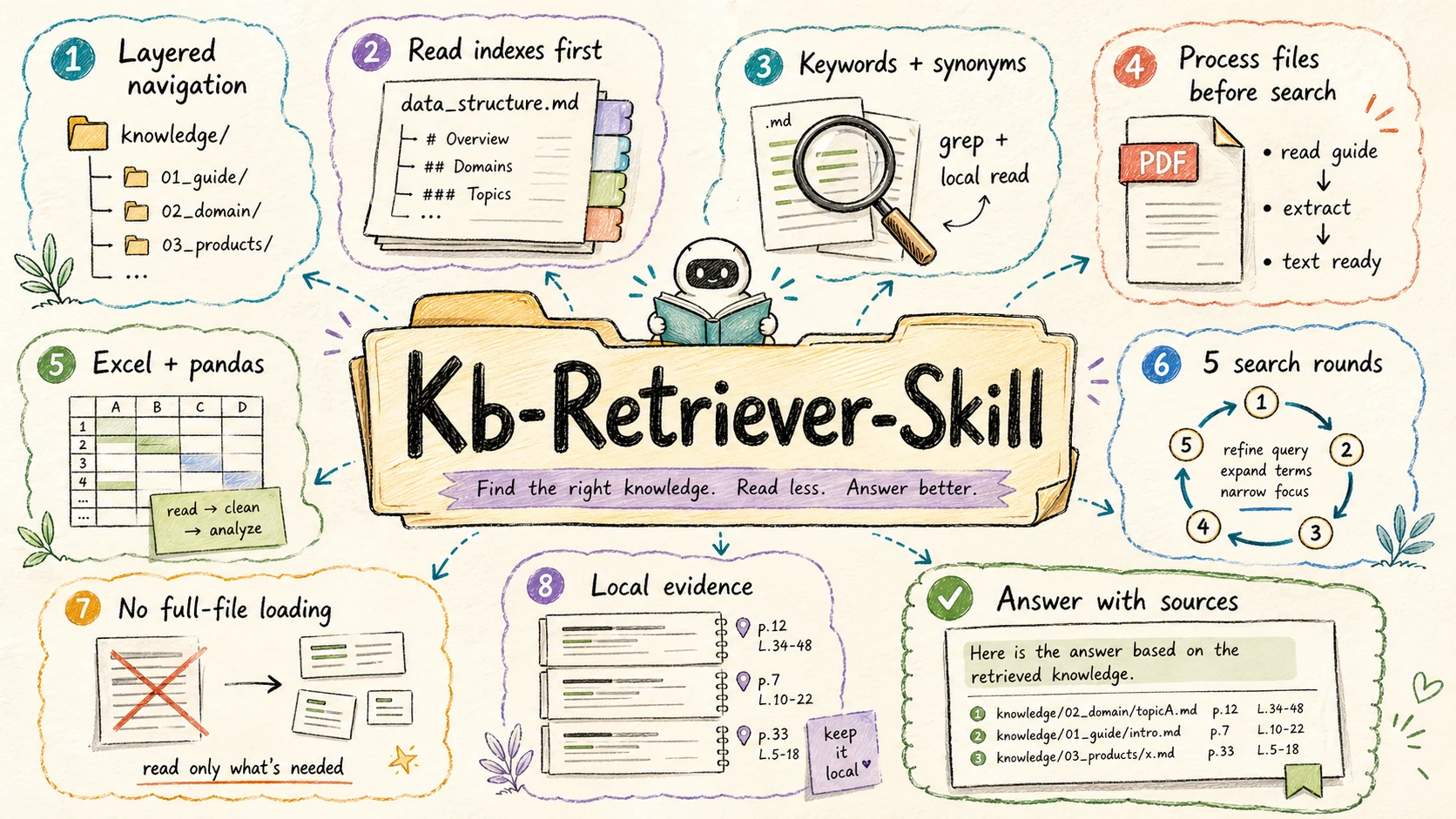
A skill for AI agents to efficiently answer questions over a local, multi-format knowledge directory using hierarchical index navigation and progressive retrieval — without ever loading whole files into context.
中文文档 · Back to collection root
What it does
Point the agent at a local directory full of mixed-format files (Markdown, PDF, Excel, …) and ask questions in natural language. The skill:
- Walks a hierarchical index of
data_structure.mdfiles to figure out which files are likely to contain the answer. - Forces a learn-before-process step when it hits a PDF or Excel — it must read the corresponding
references/*.mdfirst and use the recommended tool, instead of blindly reading the whole file. - Retrieves progressively with
grep+ small windowed reads (offset/limit) instead of dumping entire files into context. - Iterates up to 5 rounds, narrowing keywords each round until it has enough evidence to answer.
Core features
- ✅ Multi-format: Markdown / text, PDF, Excel — extensible per file type.
- ✅ Hierarchical index: each directory carries its own
data_structure.md, forming an index tree the agent navigates. - ✅ Progressive retrieval: grep-first, windowed reads, never whole-file loads — keeps token usage low even on large corpora.
- ✅ Mandatory learning step: PDF/Excel processing is gated on reading the right
references/*.mdfirst. - ✅ Bounded iteration: at most 5 retrieval rounds, with explicit termination conditions.
Skill structure
skills/kb-retriever/
├── SKILL.md                            Main skill (frontmatter name: kb-retriever)
├── README.md  /  README.zh-CN.md       This document
├── references/
│   ├── pdf_reading.md                  How to handle PDFs (pdftotext / pdfplumber / pypdf)
│   ├── excel_reading.md                How to read Excel with pandas (nrows, dtype, etc.)
│   └── excel_analysis.md               How to filter / aggregate / derive metrics on Excel
└── scripts/
    └── convert_pdf_to_images.py        Convert PDF pages to images when text extraction fails
Setting up your knowledge base
This skill does not ship a knowledge base — you bring your own. Two ways to wire it up:
Default location
Put a knowledge/ directory at the root of the workspace where you invoke the agent:
your-project/
├── .claude/skills/  or  .agents/skills/
│   └── kb-retriever/             ← this skill folder
└── knowledge/                    ← ← ← your knowledge base
    ├── data_structure.md         (root-level index, see template below)
    ├── <domain-1>/
    │   ├── data_structure.md
    │   └── ...
    └── <domain-2>/
        └── ...
Custom location
Tell the agent which path to use in your question, e.g. "answer from ./docs" or "my knowledge base is at /data/kb". The skill will use that path instead.
If the default knowledge/ does not exist and the user hasn't specified a path, the skill will ask rather than guess.
data_structure.md template
Each indexed directory should carry one of these:
# [Directory name]

## Purpose
What this directory is for and when it should be searched.

## Files
- file1.pdf — what it contains, time / version range
- file2.xlsx — schema summary, key columns
- subdir/ — what lives in this subdirectory

## Coverage
Time range, version, source, anything else that helps the agent prioritize.
How it retrieves
1. Hierarchical index navigation
For each directory level the skill reads data_structure.md, picks the most relevant child(ren) for the user's question, and recurses — so it doesn't fan out across the whole tree.
2. Learn before process (PDF / Excel)
When the candidate set contains a PDF or Excel file, the skill must first read the corresponding reference doc:
✅ Read references/pdf_reading.md  /  excel_reading.md  /  excel_analysis.md
✅ Understand the recommended tool & flags
✅ Convert / extract the file with that tool
⏭️  Then start retrieving
Forbidden:
- ❌ Trying to process a PDF without reading
pdf_reading.md - ❌ Trying to process an Excel without reading
excel_reading.md/excel_analysis.md - ❌ Skipping the conversion step and grepping the raw binary
3. Progressive retrieval
- Don't read whole files.
- Use
grepto locate keywords first. - Read only the matching window (
limit≈ 200–500 lines). - Iterate up to 5 rounds, refining keywords.
4. Per-format tool strategy
| Format | Tool | Notes |
|---|---|---|
| Markdown / text | grep + windowed read_file | Always offset/limit; never whole-file. |
pdftotext input.pdf output.txt → grep on the text | Always extract to a file, never to stdout. Use -f / -l for page ranges on huge PDFs. | |
| Excel | pandas with nrows first to learn schema, then filtered reads | Identify key columns (id / time / category) before querying. |
5. Iteration loop
Each round:
- Generate / update keywords
- Pick under-explored candidate files
- Run grep / windowed reads
- Inspect snippets
- Decide: enough to answer? → stop. Otherwise iterate.
Stops on either: answer found ✅, or 5 rounds reached ⏱️.
Best practices
Recommended
- Always start from
data_structure.md. - Read the matching
references/*.mdbefore touching a PDF or Excel. - Retrieve from the most relevant file first; expand only if needed.
- Use
offset+limitto read precise windows. - Extract PDFs to files, then grep — never paste the binary into context.
Avoid
- ❌ Reading entire large files in one go.
- ❌ Processing PDF / Excel without reading the references first.
- ❌
pdftotext input.pdf -(stdout) — eats tokens. - ❌ Loading a whole Excel sheet at once.
- ❌ Blind search across all directories.
FAQ
Q1: Why force the agent to read references/*.md first?
To make sure the agent uses the right tool with the right flags — otherwise it tends to either dump huge files into context or pick a slow / broken tool.
Q2: How do I handle a very large PDF?
Use page-ranged extraction (pdftotext -f 1 -l 10), grep the resulting text, then read only the matching pages.
Q3: Can my knowledge base live anywhere?
Yes. Just say so in your question: "answer from /data/my-kb".
Q4: How do I improve retrieval accuracy? Use specific keywords, narrow down with time / file-name hints, and prefer domain-specific terminology over generic words.
Tool requirements
The skill assumes the agent has access to:
grep— text searchread_file— windowed reads with offset / limitpdftotext(poppler) orpdfplumber— PDF text extractionpandas— Excel reads & analysis
scripts/convert_pdf_to_images.py is provided for the fallback case where text extraction yields nothing useful (scanned PDFs).
License
MIT
User Reviews (0)
Write a Review
No reviews yet
Statistics
User Rating
Rate this Skill